InfoSec / Cyber

The Government Cyber Action Plan 2026 document. UK public sector cyber security strategy.

The Government Cyber Action Plan

The Government Cyber Action Plan, published in January 2026, sets out a radical shift in how the UK public sector manages cyber security and digital resilience. It moves away from fragmented, siloed defences toward a "Defend as One" model led by a new Government Cyber Unit within the Department for Science, Innovation and Technology (DSIT).

Read more …

 A promotional image for new digital standards in education.  The top half shows four primary school-age children sitting at a desk, looking down and focusing on work. The child closest to the camera on the right is smiling.  The bottom half has an orange and blue graphic overlay that reads: "New standard announced! MEETING DIGITAL STANDARDS IN SCHOOLS AND COLLEGES." In the bottom left corner is a circle image showing students working on laptops. The text "IT Support" is written in a yellow box below the circle. In the bottom right corner is a logo for the "DATA PROTECTION EDUCATION" initiative.

IT Support Standards for Schools and Colleges Guidance (DfE Digital Standards)

The government has announced an additional Digital Standard to help with planning, commissioning and reviewing their IT support services.  The services can be internal, external or a hybrid.  Effective IT support is essential for maintaining technology, planning improvements and mitigating risks like outages and cyber incidents, and sits alongside the other 11 standards.

Read more …

"A graphic announcing 'October is Cyber Security Awareness Month,' with text explaining the importance of creating a cyber emergency contact list in preparation for a cyber attack. It also includes a 'Cyber tip' to assess passwords, turn on MFA, and review critical accounts, especially email. A shield icon with a checkmark and a lightbulb icon are visible."

October 31. On the road to improving cyber resilience

As Cyber Security Awareness Month draws to a close, it's important to recognise that cybersecurity isn't a destination; it's a continuous journey. For organisations, particularly those in the education sector, this journey often involves working towards recognised standards and certifications. In the UK, Cyber Essentials and Cyber Essentials Plus are government-backed schemes designed to help organisations protect themselves against common cyber threats. For schools, the Department for Educat

Read more …

"A graphic announcing 'October is Cyber Security Awareness Month,' with text explaining the importance of creating a cyber emergency contact list in preparation for a cyber attack. It also includes a 'Cyber tip' to assess passwords, turn on MFA, and review critical accounts, especially email. A shield icon with a checkmark and a lightbulb icon are visible."

October 29. Admin Controls & Accounts

Administrator accounts (often called "privileged accounts") are the most powerful and, so, the most sought-after targets for cybercriminals. These accounts hold the "keys to the kingdom," possessing extensive permissions to configure systems, access sensitive data, manage users, and make critical changes across an entire network or application. A single compromised admin account can lead to a catastrophic data breach, widespread system paralysis, or complete organisational takeover by attacke

Read more …

"A graphic announcing 'October is Cyber Security Awareness Month,' with text explaining the importance of creating a cyber emergency contact list in preparation for a cyber attack. It also includes a 'Cyber tip' to assess passwords, turn on MFA, and review critical accounts, especially email. A shield icon with a checkmark and a lightbulb icon are visible."

October 28. Phishing: Don't Take the Bait!

Phishing remains one of the most prevalent and effective cyberattack methods, tricking millions into compromising their data every year. These deceptive messages, often arriving via email, text message (smishing), or phone call (vishing), are designed to look legitimate. They aim to trick you into revealing sensitive information like login credentials, credit card numbers, or personal data, or to click on malicious links that install malware.  They may also be the start of a more complex

Read more …

"A graphic announcing 'October is Cyber Security Awareness Month,' with text explaining the importance of creating a cyber emergency contact list in preparation for a cyber attack. It also includes a 'Cyber tip' to assess passwords, turn on MFA, and review critical accounts, especially email. A shield icon with a checkmark and a lightbulb icon are visible."

October 27. Passwords

Your password is your first, and often most critical, line of defence. Yet, far too many people still rely on easily guessable combinations like "123456" or "password," leaving their digital lives wide open to attack. Cybercriminals use sophisticated tools to crack weak passwords in seconds, and is one of the easiest forms of attack - low risk.

Read more …

"A graphic announcing 'October is Cyber Security Awareness Month,' with text explaining the importance of creating a cyber emergency contact list in preparation for a cyber attack. It also includes a 'Cyber tip' to assess passwords, turn on MFA, and review critical accounts, especially email. A shield icon with a checkmark and a lightbulb icon are visible."

October 26. Physical Security of Digital Assets

It's easy to overlook the importance of physical security when we rely so heavily on digital systems, but it's a critical component of overall cyber security. This means protecting your devices and data from unauthorised physical access. For individuals, it's locking your laptop when you step away, securing your home network equipment, and shredding sensitive documents. For organisations, it includes controlled access to offices and server rooms, securing hardware (laptops, USB drives), and m

Read more …

"A graphic announcing 'October is Cyber Security Awareness Month,' with text explaining the importance of creating a cyber emergency contact list in preparation for a cyber attack. It also includes a 'Cyber tip' to assess passwords, turn on MFA, and review critical accounts, especially email. A shield icon with a checkmark and a lightbulb icon are visible."

October 25. Server Security: Protecting Your Digital Core

For most organisations, servers are the undisputed backbone of their IT infrastructure. They house critical applications, store vast amounts of sensitive data (customer information, intellectual property, financial records), and power essential services. Consequently, servers are prime targets for cyber attackers, making robust server security an absolute necessity, not an option. A compromise of even one critical server can bring an entire operation to its knees.

Read more …

  1. October 24. Backups: Your Recovery Safety Net
  2. October 23. Filtering and Monitoring
  3. October 22. Hardware: Printers
  4. October 21. Hardware: Asset Management
  5. October 20. Hardware: Safe disposal
  6. October 19. Anti-virus/anti-malware
  7. October 18. Regular Updates: Patching Against Threats
  8. October 17. Access Control: Managing User Privileges
  9. October 16. Access Control: Securing Your Digital Gateways (Wi-Fi & Networks)
  10. October 15. Access Control: Securing Your Home Office (Working From Home)
  11. October 14. Access Control : (Multi-factor authentication)
  12. October 13. Cyber Security Awareness
  13. October 12. Training: Empowering your human firewall
  14. October 11. Policies and Procedures: Cyber Blueprint
  15. October 10. Understanding Your Cyber Posture
  16. Time's Ticking: Windows 10 support ends in October 2025!
  17. October 9. A Guide for Education Providers
  18. October 8. How Can Your Organisation Prevent Ransomware Attacks?
  19. October 7: Under Attack: The Reality of Ransomware
  20. October 6: Cyber Action Plan and A Roadmap to Resilience
  21. October 5: Cyber Responsibilities - We're All in This Together
  22. October 4: When a Cyber Attack Hits
  23. October 3: Data Security, the Core of Protection
  24. October 2: Privacy Protection & Safeguarding Personal Data
  25. October 1: Welcome to Cyber Security Awareness Month!
  26. Nursery Cyber attack
  27. The NCSC Cyber Assessment Framework
  28. The Classroom's Dark Side: Cyber crime from the Classroom
  29. The Latest Cyber Threat: The "Murky Panda"
  30. Holiday Cheer or Cyber Fear? : Essential Pre-holiday Checks
  31. Social engineering + impersonation = Fraud ≡ cyber deception
  32. School cyber attack: Framlingham College, Suffolk
  33. Getting caught in the Scattered Spider web
  34. A Wake-Up Call for Cyber Vigilance - Danger in the Threat Landscape for Everyone
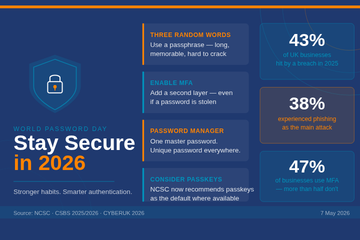
  35. World Password Day
  36. Apple removes its highest level data security tool from UK customers
  37. The role of Passkeys in Cyber Resilience and Cyber Security
  38. Ransomware-Resistant Backups
  39. Effectively communicating during a cyber incident
  40. Safeguarding Identity in Microsoft 365: Protecting the UK Education Sector Against Cyber Threats
  41. How does the recent global IT outage affect me?
  42. King's speech introduces new bills in relation to cyber security, smart data and digital information
  43. What's a Cyber Incident and what should we do?
  44. Free short cyber training for staff
  45. Children's mental health data leaked after a cyber attack
  46. Cyber Incident Review: The Benefits
  47. Cyber attack on a University
  48. Kent Councils Data Breach
  49. Phishing attacks targeting schools - alert from City of London Police
  50. Update on Advisory for Rhysida Ransomware
  51. The Crime in a Cyber Attack and a Data Breach
  52. NCSC Annual Review is published for 2023
  53. Learning from Data Breaches
  54. Windows 11 security ineffective against attacks on old devices
  55. International Counter Ransomware Initiative 2023 Joint Statement
  56. Resistant Cloud Backups
  57. Top Ten Cyber Security Misconfigurations
  58. ICO Reprimand: company suffered a ransomware attack
  59. The UK Online Safety Bill becomes an Act (Law)
  60. The importance of software updates (PaperCut vulnerability and Rhysida ransomware)
  61. Ransomware, extortion and the cyber crime ecosystem
  62. Cyber Resource: The Cyber Resilience Centre Group
  63. Email and Security: ICO recent guidance
  64. What to do in the event of a Cyber Attack
  65. Cyber Crime: AI Generated Phishing Attacks
  66. Cyber Attack: Exam Boards
  67. VICE SOCIETY - Ransomware attacks on schools
  68. Be Cyber Aware: USB Sticks
  69. Cyber Insurance in the Public Sector
  70. Types of Cyber Attacks: DDos Attack (Microsoft DDoS Attack in June)
  71. Cyber Attack: Manchester University
  72. Cyber Attack: Leytonstone School
  73. Be Cyber Aware: Firewalls
  74. Be Cyber Aware: Cyber attacks and transparency. A no blame culture
  75. Cyber Attack: Dorchester School
  76. Types of Cyber Attacks: Password Attacks
  77. Be Cyber Aware: Why regular software updates are important
  78. Cyber Attack: Wiltshire School
  79. Keeping your IT systems safe and secure
  80. Why we recommend using PIN codes on printers
  81. Types of Cyber Attacks: DDoS Attacks
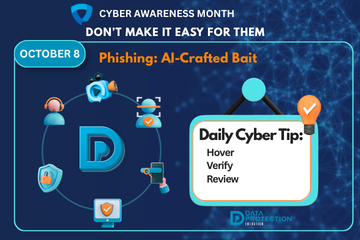
  82. Types of Cyber Attacks: Phishing
  83. Types of Cyber Attacks: The Insider Threat
  84. Why your data is profitable to cyber criminals
  85. Types of malware and how they are linked to data protection
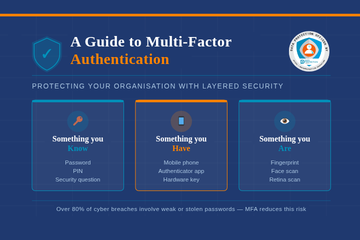
  86. A guide to multi-factor authentication
  87. How a school fought back after a cyberattack
  88. Types of Cyber Attacks - Credential Stuffing
  89. January Cyber update - How Can Schools Help Prevent Cyber Attacks?
  90. The Education sector now at highest risk of cyber attacks
  91. Cyber Attacks
  92. Emails – good practice and minimising the risk of a data breach

Search